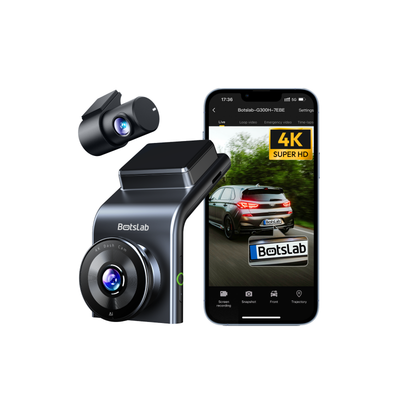
Budget for storage, power accessories and installation—not just the camera. This BOTSLAB G300H Plus dash cam buying and installation planning guide helps drivers considering front-and-rear recording prepare a purchase list, plan safe mounting and check that footage can be retrieved.
These are planning instructions, not a hands-on review or vehicle-specific wiring guide. A dash cam cannot prevent incidents or guarantee readable number plates, accepted evidence or an insurance outcome.
1. Match the English Version package to your needs
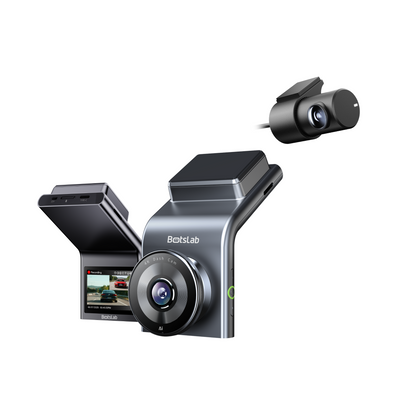
BOTSLAB’s G300H Plus English Version listing describes a two-camera package covering the front and rear. Its product highlights identify a 4K front camera with an adjustable lens; do not assume that the rear camera also records in 4K. Establish the rear-camera resolution before buying if it is important to your decision.
The package is worth considering if you want recordings from both directions and can accommodate a rear camera and its cable route. If you only need forward coverage, a front-only setup may involve less installation work. Keeping an existing camera is also sensible if it already meets your needs and reliably produces retrievable footage.
BOTSLAB’s listing, recorded on 10 October 2026, showed US$109, against a displayed regular price of US$159. Prices throughout this guide are snapshot references, not live quotes or confirmation of stock; check the selected package and delivered total before ordering.
Explore the English Version package at BOTSLAB through the links below. AveroTeam may earn a commission from purchases made through our links.
Result: You know which variant and camera configuration you are evaluating, without assuming specifications from another BOTSLAB model.
Source: BOTSLAB
2. Calculate the camera-plus-installation budget
BOTSLAB’s G300H Plus FAQ says a separately purchased hardwire kit is required for 24-hour parking monitoring. Buying the camera alone therefore does not establish that capability. This requirement is not a promise of uninterrupted recording under every vehicle or battery condition.
The G300H Plus product page also lists separately priced accessories:
| Reference item | Listed price | Budget treatment |
|---|---|---|
| G300H Plus English Version front-and-rear package | US$109 | Camera purchase |
| Botslab Flash Memory Card 256 G | US$69 | Optional storage choice |
| Type-C Fuse Tap Hardwire Kit for G980H Series & G300H Plus | US$39.99 | Separately purchased parking-monitoring power accessory |
These items are not a mandatory bundle. The camera listing states that microSD storage is not included and supports capacities up to 256GB. The hardwire kit’s name explicitly includes the G300H Plus; confirm vehicle suitability before choosing it. Do not substitute another kit merely because it appears among BOTSLAB’s accessories.
Build an itemized estimate using:
Installed total = camera + suitable storage + required power accessories + shipping + applicable taxes + installation labor.
A driver interested only in journey recordings needs the documented driving-power arrangement. A driver who also wants parked-car recordings needs to budget for the required hardwire setup and any professional installation it entails. Keep delivery and installer charges separate until you have quotes.
Check deal: BOTSLAB G300H Plus English Version — Save $50
The linked offer concerns the camera package, not a discount on the complete installed system. For general merchant navigation, visit BOTSLAB.
Result: Your budget includes the equipment needed for your intended use, with unresolved charges clearly identified.
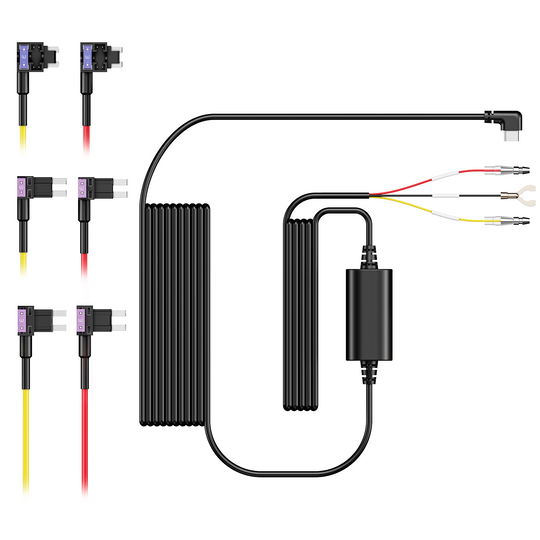
Source: BOTSLAB
3. Resolve storage, app and ordering questions
BOTSLAB lists a 2.0-inch IPS screen for live viewing and video downloads through 2.4G WiFi. These features provide viewing options, but you should establish the supported phone and app requirements before relying on wireless retrieval.
Use the exact model’s documentation and selected package details to settle these questions before paying:
- Variant and contents: Is this the intended English/regional version, and which mounts, cables and power accessories are included?
- Memory card: Within the stated maximum of 256GB, what speed and endurance requirements apply? What formatting procedure does BOTSLAB specify? Check any existing card against those requirements rather than assuming it is suitable because it fits.
- Phone and viewing method: Does your phone meet the requirements for the supported app and regional version? Establish the documented way to view and export footage.
- Parking power: Confirm the approved kit, vehicle suitability, battery-protection behavior and operating conditions with BOTSLAB or the installer.
- Order terms: Check destination availability, delivery charges, applicable taxes and return terms for the selected package.
Result: You have a purchase list with essential compatibility questions resolved. Postpone the order if a requirement central to your use remains uncertain. If this configuration does not suit your vehicle or budget, browse alternatives in Dash Cameras.
4. Plan clear views and safe cable routing
Agree on front and rear mounting positions before fixing anything permanently. Follow the manufacturer’s instructions and applicable mounting rules, keeping the driver’s view unobstructed while giving each camera a useful view through the glass.
At the rear, consider window visibility and whether a hatch or door moves near the proposed cable path. Plan routing that avoids pinching, tension, vehicle controls and airbag deployment paths. Hiding a cable behind trim does not by itself make the route safe.
If you are uncertain about airbag locations, trim removal or hardwiring, use a qualified installer. Fuse selection and electrical connections require vehicle-specific assessment and are outside this guide. Ask the installer to include both camera mounting and the intended power arrangement in the quote.
Result: You have agreed mounting positions, a safe routing plan and a clear decision about professional installation.
5. Check that recordings can be viewed and exported
Powering on is only the start. With the vehicle safely parked, follow BOTSLAB’s official storage and setup procedure, then validate the recordings through the supported viewing method.
- Inspect both camera views. Look for useful framing and obstructions before accepting the mounting positions.
- Play recorded clips from both cameras. Confirm that each plays and that timestamps are accurate and usable.
- Export a test clip. Open the exported file independently of the camera’s live view to establish that you can retrieve footage when needed.
- Check recording continuity. Follow the manual’s loop-recording guidance to establish that new recordings continue and older ordinary footage is handled as documented. Preserve important clips before overwrite or formatting.
- Demonstrate parking operation, if installed. Have the installer show its intended behavior under the documented conditions rather than treating the presence of a hardwire kit as proof that it works.
Result: You have playable front-and-rear recordings, an exported file that opens successfully and a repeatable way to check the setup.
6. Troubleshoot the specific failed check
A failed test is a reason to investigate before relying on the camera, not proof that a particular component is defective.
| Failed check | Next action |
|---|---|
| Clips are missing or will not play | Review card suitability and the documented storage procedure. Back up wanted footage before formatting. |
| Rear-camera footage is missing | Follow the documented connection checks or ask the installer to inspect the installation. |
| Viewing or exporting fails | Revisit regional-version and phone compatibility, then consult BOTSLAB support with the exact symptom. |
| Expected parking recordings are absent | Ask the installer to assess the approved power setup and documented settings; do not experiment with fuse connections. |
Repeat the failed test after the issue is addressed. If it still fails, escalate it to BOTSLAB or the installer. The finish line is a safe installation that produces recordings you know how to preserve and retrieve.
Sources and editorial note
Specifications, package pricing and parking-mode requirements: BOTSLAB G300H Plus official listing and FAQ, reviewed 10 October 2026. This guide is based on product research rather than hands-on testing.